

How to Generate AI Music with Suno V6 on Versely
Make a full track with Suno V6, V6 Mini or V6 Wild in Versely's Music studio, web and iOS: describe or write lyrics, pick a model, two takes for 3 credits.
Suno's V6 family is the default in Versely's Music studio: Suno V6, V6 Mini and V6 Wild, each 3 credits per generation (down from 5, a 40% cut), and each generation returns two takes. The video above is the full web run: describe a late-night alt-pop track, pick V6, send, and get two 3-minute-plus songs back. This post gives the same clicks on the web and the same taps in the iOS app, plus what the Custom, Instrumental and Continue controls do.
For which variant suits which brief, read Suno V6 live on Versely. For prompt structure, the music prompts for Suno guide. This page is only the how.
The picker, with prices
Open the model chip in the Music studio and the Choose a model list reads, in order:
| Model | Card blurb | Credits per generation |
|---|---|---|
| Suno V6 | Newest - most natural vocals | 3 (was 5) |
| Suno V6 Mini | Lighter and faster V6 | 3 (was 5) |
| Suno V6 Wild | Bolder, more experimental | 3 (was 5) |
| Suno V5.5 | Previous generation | 5 (was 10) |
| Suno V5 | Previous generation | 8 (was 16) |
| Lyria 3 Pro | Google - full-length instrumental | 7 |
| Lyria 3 Clip | Google - short clip | 4 |
| Sonilo | Licensed, royalty-free, per second | 1 |
| Sonilo Video | Scores your video | 1 |
| MiniMax Music 3 | Full songs to 5 min - your lyrics | 1 |
The footer of the list says it plainly: Prices are for one track at the length you have set. For Suno there is no length control; the model decides, and V6 runs to several minutes. One generation, two takes, 3 credits.
One correction to an earlier note on this blog: V6 Mini is not free on Versely. It is billed at the same 3 credits as V6 and V6 Wild, because the provider quotes one price for the whole V6 endpoint. Mini is the faster, lighter lane, not the free one.
On the web (app.versely.studio)
- Sign in at app.versely.studio and click Music under Create in the sidebar. The URL is
/music. The page header reads Music with your track count.
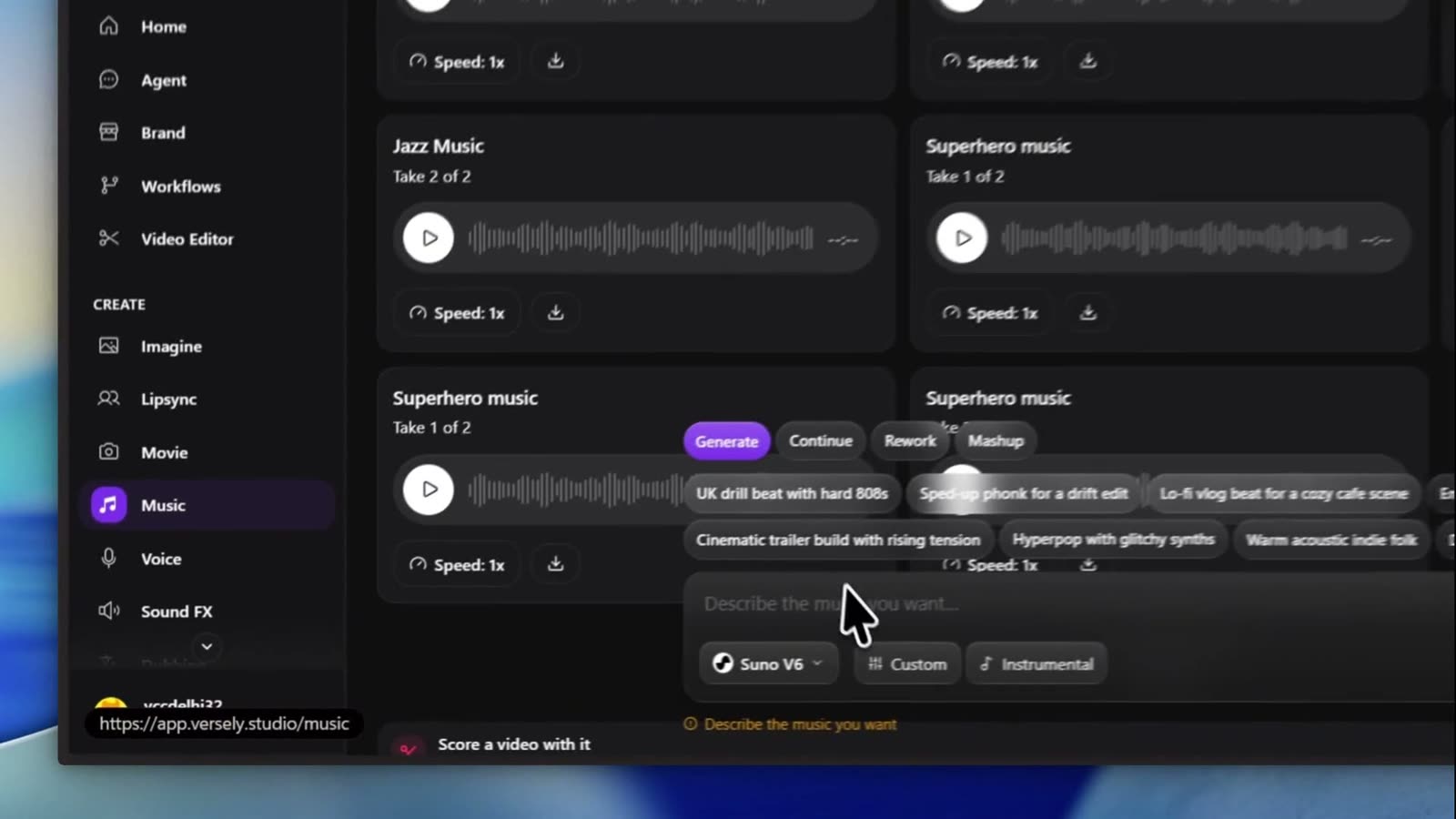 The Music studio. Finished tracks are cards with a waveform, play button, playback speed and a download icon. The composer sits at the bottom.
- The composer has four tabs above the prompt: Generate, Continue, Rework, Mashup. Stay on Generate.
- Click the model chip (it shows the current model with the Suno mark). The Choose a model list opens. Click Suno V6. The card shows 3 with 5 struck through and -40%.
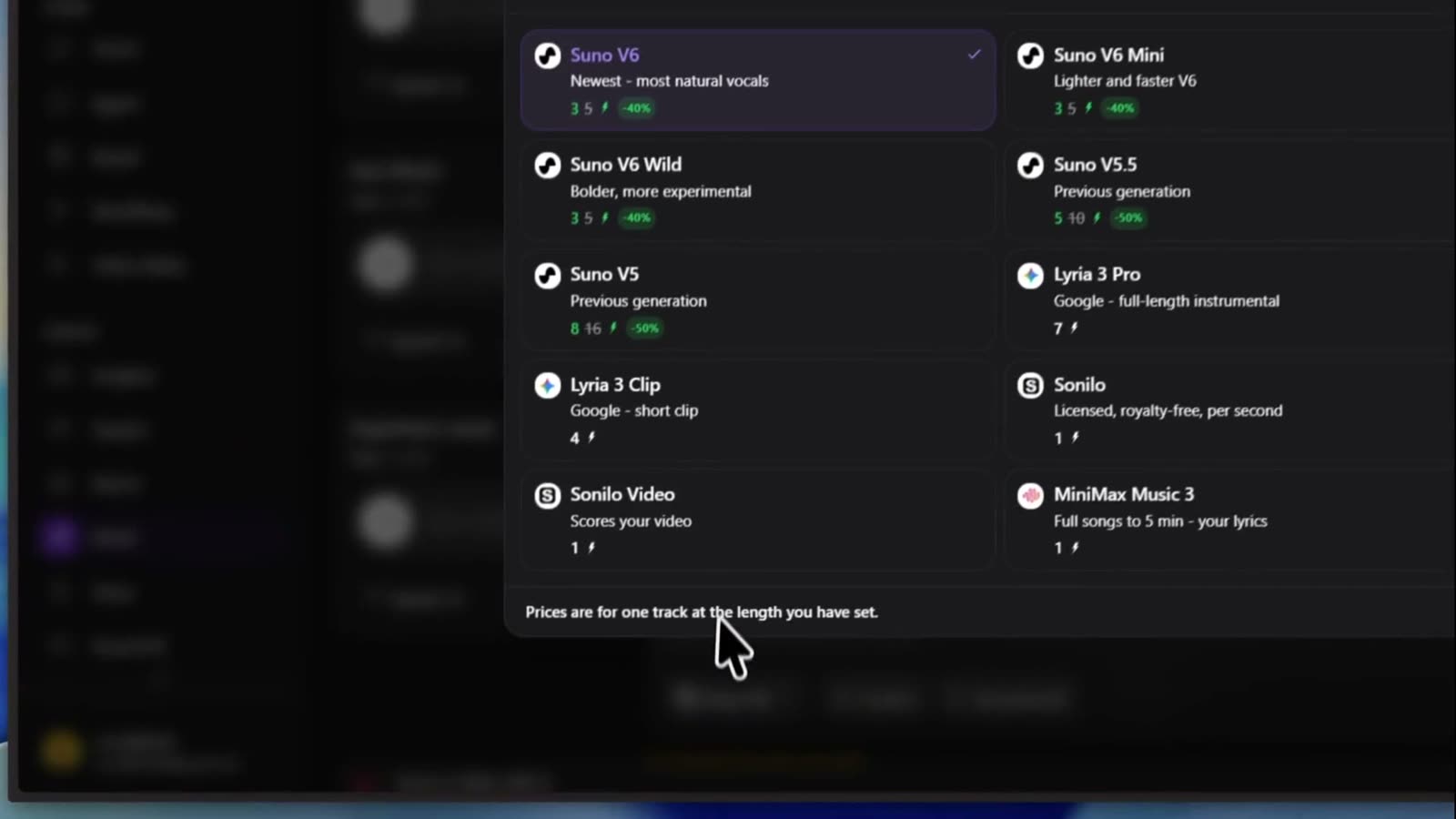 Every music model in one list with its price. Suno V6 is checked.
- Type the brief in Describe the music you want.... The one from the video:
Cinematic late-night alt-pop, 92 BPM, intimate male vocal, soft piano, warm analog synths, muted electric guitar, deep restrained bass, punchy minimal drums, atmospheric city-night feeling. Conversational verses, unforgettable emotional chorus. Lyrics about walking alone at 2 AM and finally being okay with letting someone go. Organic imperfections, analog warmth, spacious mix, modern indie/alternative R&B, emotionally subtle, not cheesy, not overproduced, no EDM drop.
The genre chips above the box (UK drill beat with hard 808s, Sped-up phonk for a drift edit, Lo-fi vlog beat for a cozy cafe scene, Emotional cinematic piano, Cinematic trailer build with rising tension, Hyperpop with glitchy synths, Warm acoustic indie folk, Dreamy Y2K bedroom pop) drop a starter description in if you would rather edit than write.
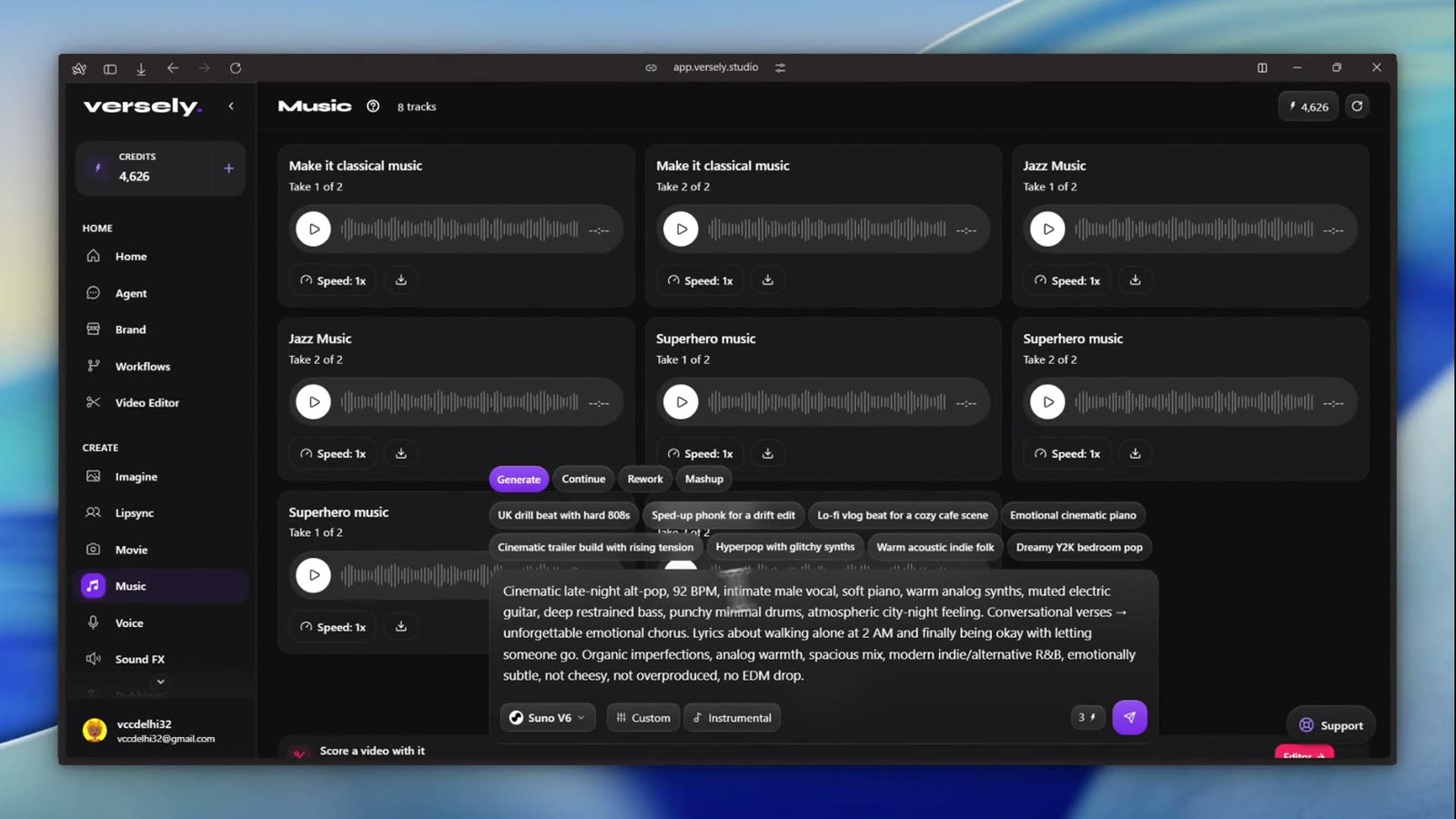 Brief in, Suno V6 selected, 3 credits on the badge. Custom and Instrumental sit next to the model chip.
- Leave Custom off for a description-only brief. Turn it on when you have your own words: two fields appear, Style (for example "dream pop, hazy guitars") and Title, and the main box becomes Write the lyrics.... Custom mode also adds a voice dropdown (Any voice, Female, Male) and a Weights chip for style and weirdness, which you can leave alone.
- Click Instrumental for a bed with no vocals. With Custom and Instrumental both on, the lyrics box turns off and reads No lyrics needed for an instrumental.
- Click the send arrow. A card appears at the top of the grid with your brief as its title and Still generating... underneath.
- A minute or two later two cards replace it, Take 1 of 2 and Take 2 of 2, each with a play button, waveform, duration, Speed: 1x and a download icon. In the video the takes ran 3:46 and 3:43.
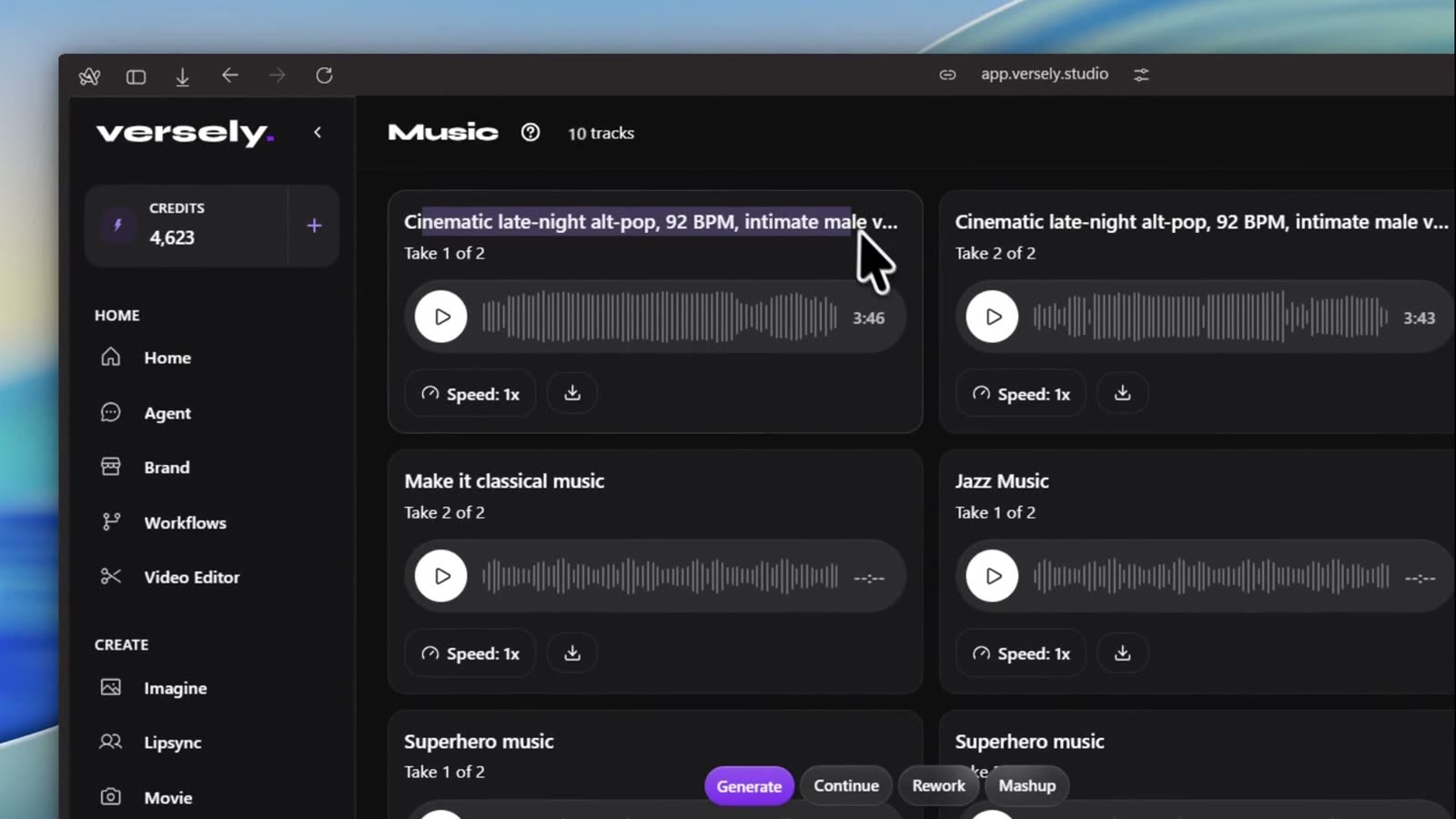 Two takes for one 3-credit generation. Play them back to back before you pick; the second is often the keeper.
- Click the download icon on the take you want. Every track also appears under Generations in the sidebar, in the Music tab. Score a video with it at the bottom of the studio hands the track to the editor.
Extending, reworking and mashing up
- Continue picks up a finished Suno track. Choose it in the Pick a track dropdown, set From (s) to the second you want the continuation to start, and send. Extend music continues a Suno track you already have explains the seam.
- Rework uploads a track and offers Cover, Continue, Add instrumental and Add vocals.
- Mashup combines sources into one request.
In the iOS app
The Versely Studio app has the same models and the same tabs.
- Accept the AI data consent notice on first launch. It lives under Settings, AI Data & Privacy afterwards.
- Tap the centre + on the tab bar, then Music Studio. The screen title reads Music. You can also reach it from Home, the Music folder in the model browser, by tapping a model card.
- The input card has four tabs: Generate, Continue, Remix, Mashup. Stay on Generate.
- Tap the model chip. The Select Music Model sheet opens with Search models... and a Suno AI rail first: V6, V6 Mini, V6 Wild, V5.5, V5, each with a tier badge, the struck-through full price and the green discount tag. Tap V6.
- Type the brief in Describe the music you want to create....
- Tap Custom for your own lyrics. A Title field appears, the box becomes Lyrics/Description..., and a Style chip opens a genre sheet. The AI lyrics chip drafts words for you and costs 1 credit.
- Tap Instrumental for no vocals. With Custom on, the box reads Instrumental, lyrics are not used.
- Tap send. The card walks through Composing music, Still composing and Mixing tracks.
- Each finished track card has a row of actions: Video (2 credits, a music video from the track), Continue (extend), Split (1 credit, vocal and instrumental stems), WAV (1 credit), Lyrics (timestamped), Share and Save. Save writes the file to your device; tracks also live in Media under Music.
Getting a track people keep
A few things that made the difference across takes:
- Give tempo, instruments and a feeling, in that order. "92 BPM, soft piano, warm analog synths, city-night" set the bed. Genre words on their own drift.
- Write the story of the lyric, not the lyric, in description mode. "Walking alone at 2 AM and finally being okay with letting someone go" gave V6 the arc. Switch to Custom when the words themselves matter.
- Ban the defaults. "No EDM drop, not overproduced" removed the two things Suno reaches for when unsure.
- Run the same brief on Mini, V6 and Wild once and listen back to back. Mini for sketches, Wild for surprises, V6 to lock.
- Check the lyric before the video. Lyrics first is the review pass that saves a re-render.
If the track goes under a voiceover, ducking music under a voiceover is the next read.
What I'd actually do
- Open app.versely.studio/music, pick Suno V6, and send the brief in description mode. 3 credits, two takes.
- Pick the take. If the chorus is right but the intro is long, use Continue from the good bar rather than regenerating.
- If neither take lands, rerun on V6 Wild for a left-field option, then bring the idea back to V6 with a tightened brief.
- Turn Custom on only when the words are the point. Write the lyric outside the box first, then paste.
- Score a video with it, add captions, and post.
FAQ
How much does Suno V6 cost on Versely?
3 credits per generation on V6, V6 Mini and V6 Wild during the 40% promotion, and each generation returns two takes. V5.5 is 5 and V5 is 8.
Is Suno V6 Mini free?
No. Mini is billed at the same 3 credits as V6 and V6 Wild. It is the faster, lighter variant.
Can I write my own lyrics?
Yes. Turn on Custom. On the web the box becomes Write the lyrics... with Style and Title fields above it; in the app it becomes Lyrics/Description... with a Title field and a Style chip.
How long are the tracks?
Suno decides the length; there is no duration control for the Suno rows. The two V6 takes in the video ran 3:46 and 3:43. Sonilo and MiniMax expose length menus instead.
Can I extend a track?
Yes. Use the Continue tab on the web, or the Continue action on a track card in the app, and set the second to continue from.
Can the Versely agent make music?
Yes. In Agent, describe the track and it calls the music tool. Name the model if you care which Suno variant it uses.
Start at app.versely.studio/music, or read the AI music generator overview if you are still choosing between Suno, Lyria and Sonilo.
Versely AI Weekly
New AI models, every Thursday.
The image, video, audio and LLM models released that week, what each is good for, and what's new on Versely.