

Trending Videos with Alibaba's Wan 3.0 on Versely
Generate a Wan 3.0 clip with native audio in Versely, web and iOS app: pick the row, set ratio, 2 to 15 seconds, 480p to 1080p. From 3 credits a second.
Alibaba's Wan 3.0 is the number one text-to-video model on the Artificial Analysis with-audio board, and on Versely it is the cheapest of the late-summer flagships: 30% off, so a second of 720p is 6 credits and a second of 1080p is 12. The video above is the full web run for a 10-second vertical road film, 56 credits, with the clip playing at the end. Below: the exact clicks on the web, the exact taps in the iOS app, and the prompt.
For the leaderboard context, read Wan 3.0 tops one board, misses another. For the three-way pick, Seedance 2.5 vs Wan 3.0 vs H3. This page is only the how.
Six rows, two tiers
| Row | Inputs | Per second at 480p / 720p / 1080p |
|---|---|---|
| Wan 3.0 Text to Video | Prompt, optional audio file | 3 / 6 / 12 credits (was 4 / 8 / 16) |
| Wan 3.0 Image to Video | Prompt + First frame, optional Last frame, optional audio | 3 / 6 / 12 (was 4 / 8 / 16) |
| Wan 3.0 Reference to Video | Prompt + up to 10 images, 5 videos, audio | 3 / 6 / 12 (was 4 / 8 / 16) |
| Wan 3.0 Prime Text to Video | Same, served faster | 6 / 12 / 23, no discount |
| Wan 3.0 Prime Image to Video | Same, served faster | 6 / 12 / 23, no discount |
| Wan 3.0 Prime Reference to Video | Same, served faster | 6 / 12 / 23, no discount |
Shared controls on every row:
- Aspect ratio: 16:9, 9:16, 1:1, 4:3, 3:4 (Image to Video and Reference to Video add adaptive, which follows the source)
- Length: every second from 2s to 15s
- Quality: 480p, 720p, 1080p
- Audio: generated natively with the picture. The rows also accept an optional Audio file if you want the clip built to a track you already have.
- Seed under advanced settings, for repeatable takes.
The Prime tier is the same model served on a faster lane at roughly 1.4 times the price and without the promotion. Use it when the deadline is today, not because the output is different.
On the web (app.versely.studio)
- Sign in at app.versely.studio and click Imagine under Create.
- Click Video on the Image | Video toggle.
- Click Models. In the Video Models dialog, type
wan 3in Search models.... On the Text to Video tab click Wan 3.0 Text to Video. The card shows a HOT badge, the range 6 - 168 credits and a green -30%. Click Done.
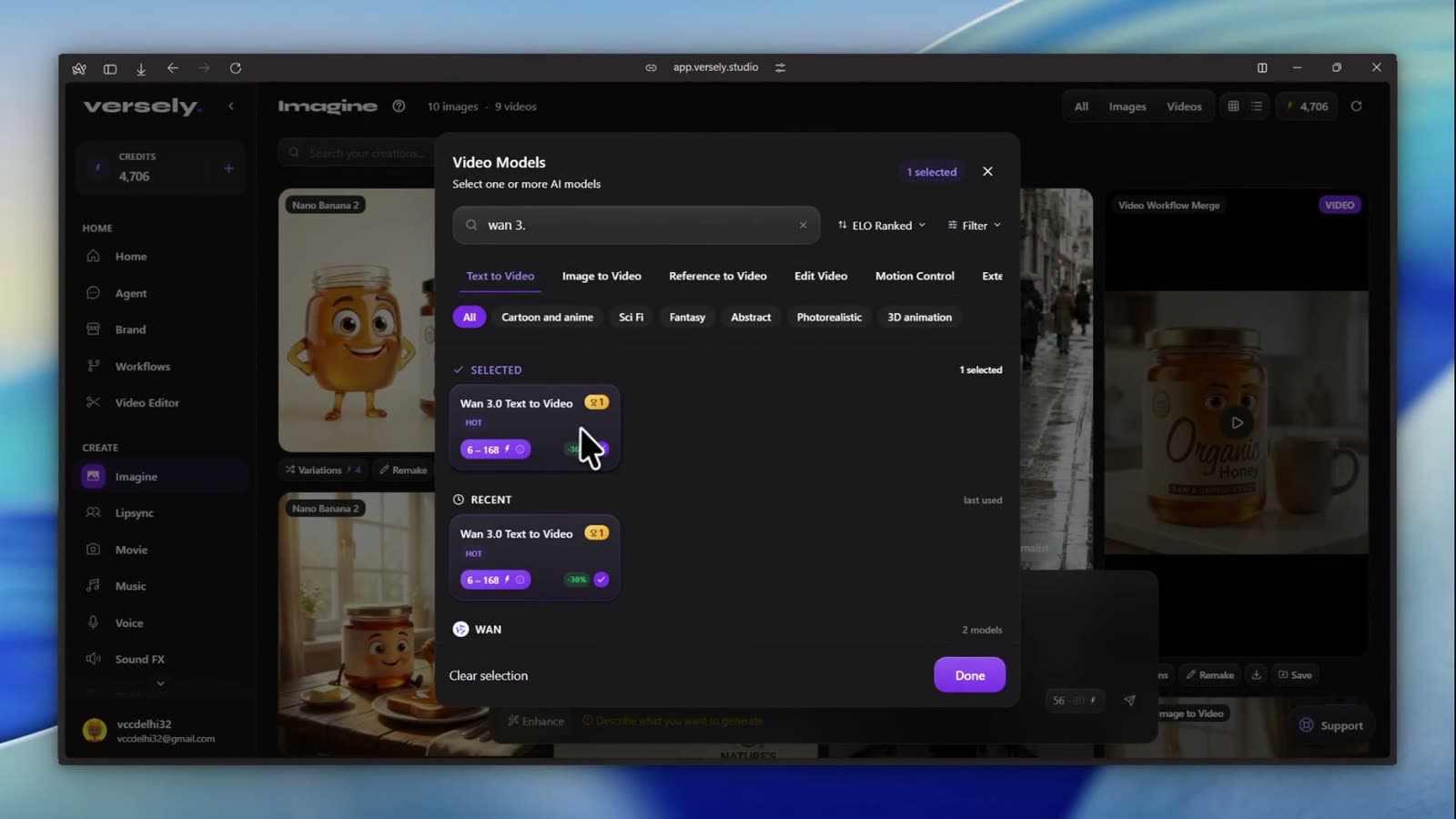 Search narrows the dialog to the Wan rows. Image to Video and Reference to Video live on their own tabs.
- Type the prompt. From the video:
A cinematic 10-second shot from the passenger seat of an old car driving through Rajasthan at sunset. Through the dusty window, camels and distant villages pass slowly. The driver's hand rests casually on the steering wheel. Dashboard vibrations and reflections move naturally across the glass. Sunlight becomes orange as the road curves around a small hill. Nostalgic documentary road-film aesthetic, realistic dust and imperfections, no commercial car-ad feeling.
- Set the chips: 9:16 for the ratio, 10s on the clock chip, 720p on the quality chip. The badge next to the send button reads 56 with 80 struck through.
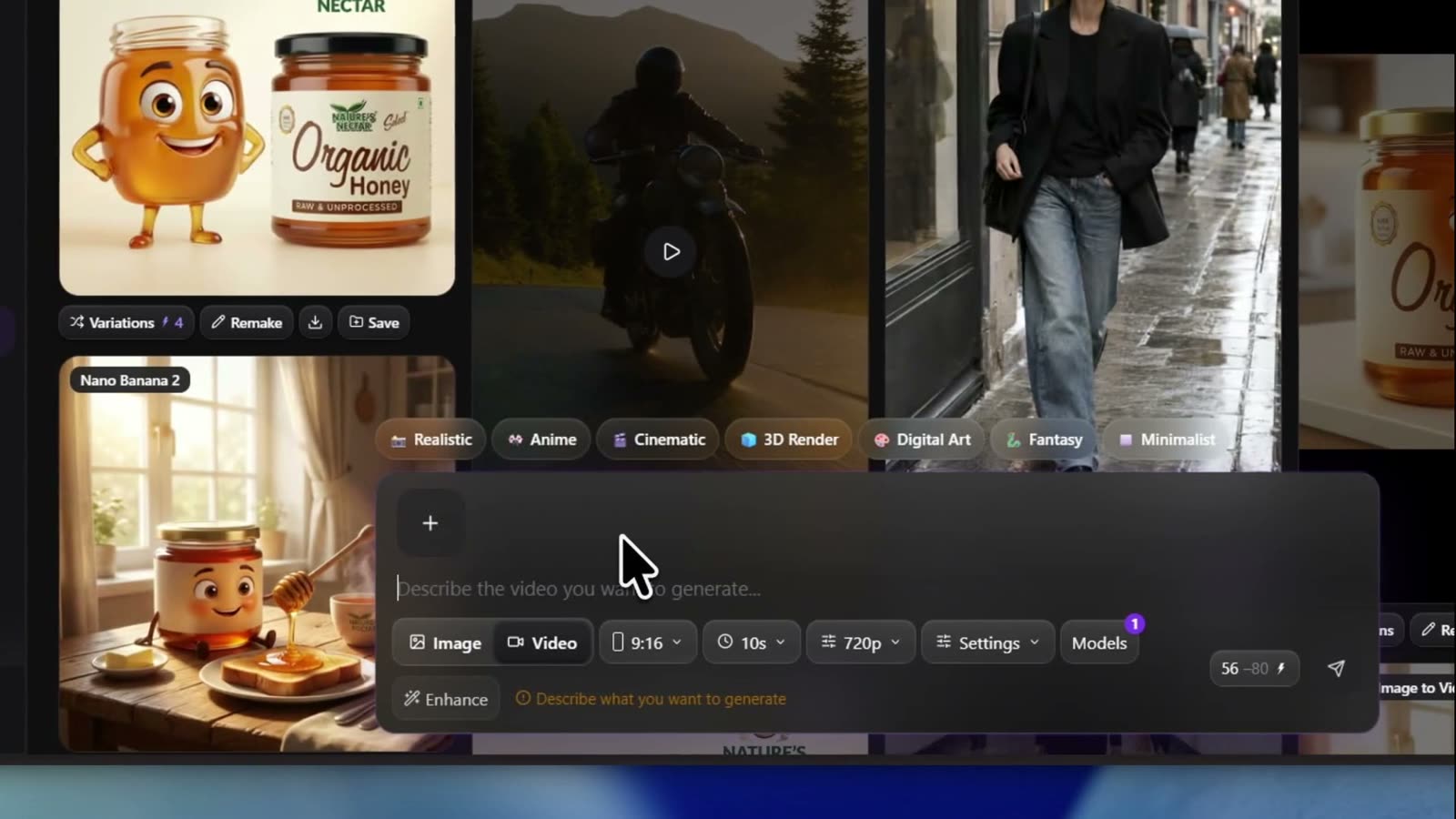 Ten seconds at 720p, portrait: 56 credits. Bump to 1080p and the same clip is 112.
- Click the send arrow. Generation started shows and the card counts up. Wan is quick; short clips return in a minute or two.
- When the toast says Video ready, click the card to play it with sound. Download saves the mp4. Regenerate reruns the same settings.
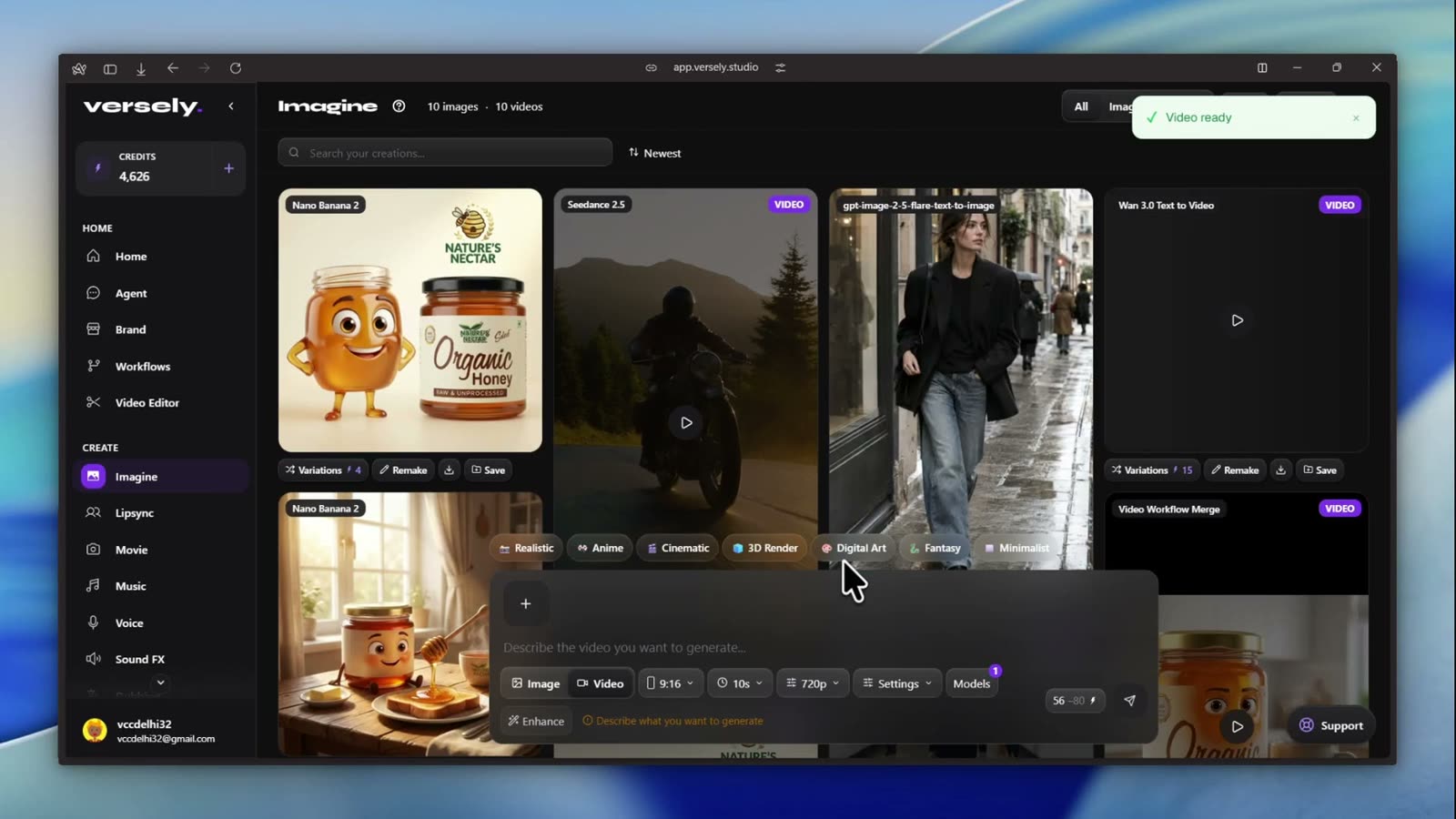 Video ready. The Wan 3.0 Text to Video card sits at the top of the grid with the VIDEO tag.
Shortcut: app.versely.studio/imagine?model=Wan 3.0 Text to Video&mode=video opens the composer with the model already selected.
Animating a still
Switch the tab to Image to Video, choose Wan 3.0 Image to Video, and drop your still into the First frame slot above the prompt. Add a Last frame if the clip should land on a second image (a before-and-after, a pack shot to a lifestyle shot). The ratio follows the image unless you pick one.
Building from references
Choose Wan 3.0 Reference to Video and click References. The modal accepts reference images (up to 10), reference videos (up to 5) and audio. Address them in the prompt by position. Wan 3.0's document-to-video and web-page-to-video inputs exist on the API but are not exposed in the Imagine composer yet; Wan 3.0 document to video covers what they do.
In the iOS app
The Versely Studio app lists every Wan 3.0 row. The controls are generated from the row's contract, so the labels below are what the app draws.
- Accept the AI data consent notice on first launch (Alibaba is listed). It lives under Settings, AI Data & Privacy afterwards.
- Tap the centre + on the tab bar, then Video Studio.
- Tap Choose models. In Select Video AI Models, stay on the Text to Video chip, search
wan 3and tap Wan 3.0 Text to Video in the Wan rail. The funnel icon in the search bar sorts by ELO Ranked, Latest, Fast, Price: Low or Price: High. Tap Done. - Type or dictate the prompt.
- Tap the aspect chip (Aspect Ratio), the clock chip (Video Duration, 2s to 15s) and the quality chip (Video Quality: SD is 480p, HD holds 720p and 1080p; the per-tier menu picks which).
- Optional: the Upload button attaches an audio file for the Audio slot, if you want the clip built to your own track. Otherwise Wan generates the sound.
- For Image to Video, fill the First Frame slot (and Last Frame if you want an end frame).
- Tap ↑. The lightning badge is the price. The clip lands in the studio feed and in Media under Videos. Download saves it to your camera roll, Share sends it on.
Prompting Wan 3.0 for a clip people finish
Wan 3.0 is strong on physical detail and on audio that matches the picture, so brief the physics and the sound:
- Name the surface and the vibration. "Dashboard vibrations and reflections move naturally across the glass" is doing the work in the prompt above.
- Let the light change. "Sunlight becomes orange as the road curves" gives the model a reason for the shot to last 10 seconds.
- Say what it is not. "No commercial car-ad feeling" kept it out of the glossy default.
- Write the sound. Engine hum, wind through a cracked window, distant bells. Wan carries native audio and will build what you describe.
- Test at 480p for 3 credits a second. A 5-second 480p test is 15 credits. Only the keeper needs 1080p.
Vertical at 1080p (1080 by 1920) is the right export for Reels and TikTok and costs 12 credits a second here, so a 10-second hero post is 120 credits.
What I'd actually do
- Open app.versely.studio/imagine in Video mode with Wan 3.0 Text to Video selected.
- Run the brief at 480p, 5s, 9:16 (15 credits). Check the motion and listen to the audio.
- When it works, Regenerate at 720p or 1080p and the real length.
- For a product, generate the still first (GPT Image 2.5 or Grok Imagine), then animate it with Wan 3.0 Image to Video so the packshot holds.
- Take the mp4 into the video editor for captions and a hook card, then post.
FAQ
How much does Wan 3.0 cost on Versely?
3 credits a second at 480p, 6 at 720p and 12 at 1080p on the three standard rows during the 30% promotion. Prime rows are 6, 12 and 23 with no discount. The composer shows the exact total before you send.
Does Wan 3.0 generate sound?
Yes. Native audio is generated with the picture on every row. You can also attach an audio file to build the clip to a track you already own.
What is the difference between Wan 3.0 and Wan 3.0 Prime?
Same model, faster lane, higher per-second rate, no discount. Pick Prime for a deadline, not for quality.
Can I do document-to-video in Versely?
Not from the composer yet. The API-level inputs exist; the Imagine studio currently exposes images, videos and audio as references.
Can I generate it from the Versely agent?
Yes. In Agent, describe the shot and name the row, for example "use Wan 3.0 Image to Video". The agent matches model names literally, so use the full name.
Start at app.versely.studio/imagine, or compare every video model on the AI video generator page.
Versely AI Weekly
New AI models, every Thursday.
The image, video, audio and LLM models released that week, what each is good for, and what's new on Versely.