

How to Make Viral Videos with Seedance 2.5
Make a Seedance 2.5 clip in Versely on web and iOS: text, image or reference to video, 4 to 30 seconds, native audio, 720p. From 22 credits.
Seedance 2.5 is ByteDance's single-pass model: one prompt, up to 30 seconds of video with synced native audio, and the whole shot reasoned about at once so the subject does not drift between second 3 and second 23. On 29 October 2026, text to video and image to video on Versely are 70% off, which makes a second of 720p 11 credits instead of 38; Reference to Video is at full price. The video above, recorded on 13 September during an earlier 50% promotion, is the entire web run for an 8-second vertical fashion film, and the finished clip plays at the end. This post gives you the same clicks on the web and the same taps in the iOS app.
If you want the model background first, read what 30-second single-pass generation changes and how to brief a 30-second Seedance 2.5 take. This page is only the how.
Three rows, one model
| Row | Inputs | When to use it |
|---|---|---|
| Seedance 2.5 | Prompt only | A shot that exists only in words |
| Seedance 2.5 Image to Video | Prompt + First frame, optional Last frame | You already have the still (a product shot, a GPT Image 2.5 keeper) |
| Seedance 2.5 Reference to Video | Prompt + up to 30 reference images, 10 videos, 10 audio clips | A character, set or palette that must hold across the take |
Every row shares the same controls:
- Aspect ratio: 21:9, 16:9, 4:3, 1:1, 3:4, 9:16, adaptive, auto
- Length: every second from 4s to 30s
- Quality: 480p or 720p. There is no 1080p on Seedance 2.5, on any host. See the 720p ceiling on Versely before you promise a client 1080p.
- Audio: a toggle, on by default. The soundtrack is generated with the picture.
- Format: mp4 or mov, under advanced settings.
What it costs
Seedance 2.5 bills per second by resolution. The discount below is the one running on 29 October 2026 on the text and image rows:
| Quality | Text or image, per second | Full rate | Reference to Video |
|---|---|---|---|
| 480p | 6 credits | 17 | 17 credits |
| 720p | 11 credits | 38 | 38 credits |
The 8-second 720p clip in the video quoted 149 credits, with 297 struck through, at the 50% promotion of 13 September. At the 29 October rate the same clip is about 90 credits. A 4-second 480p test is 22 credits, and a 30-second 720p take tops out at 320. On Reference to Video the same jobs run from 67 to 1,114. The composer shows the exact number before you send, and if a discounted provider is busy and the job falls back to a full-price one, the higher amount is held and the difference refunded.
On the web (app.versely.studio)
- Sign in at app.versely.studio and click Imagine under Create.
- Click the Video half of the Image | Video toggle at the left of the composer.
- Click Models. The Video Models dialog has tabs for Text to Video, Image to Video, Reference to Video, Edit Video, Motion Control and Extend. Stay on Text to Video, find Seedance 2.5 (in the recording it carries a HOT badge; the card shows the current credit range and any discount), click it, then Done.
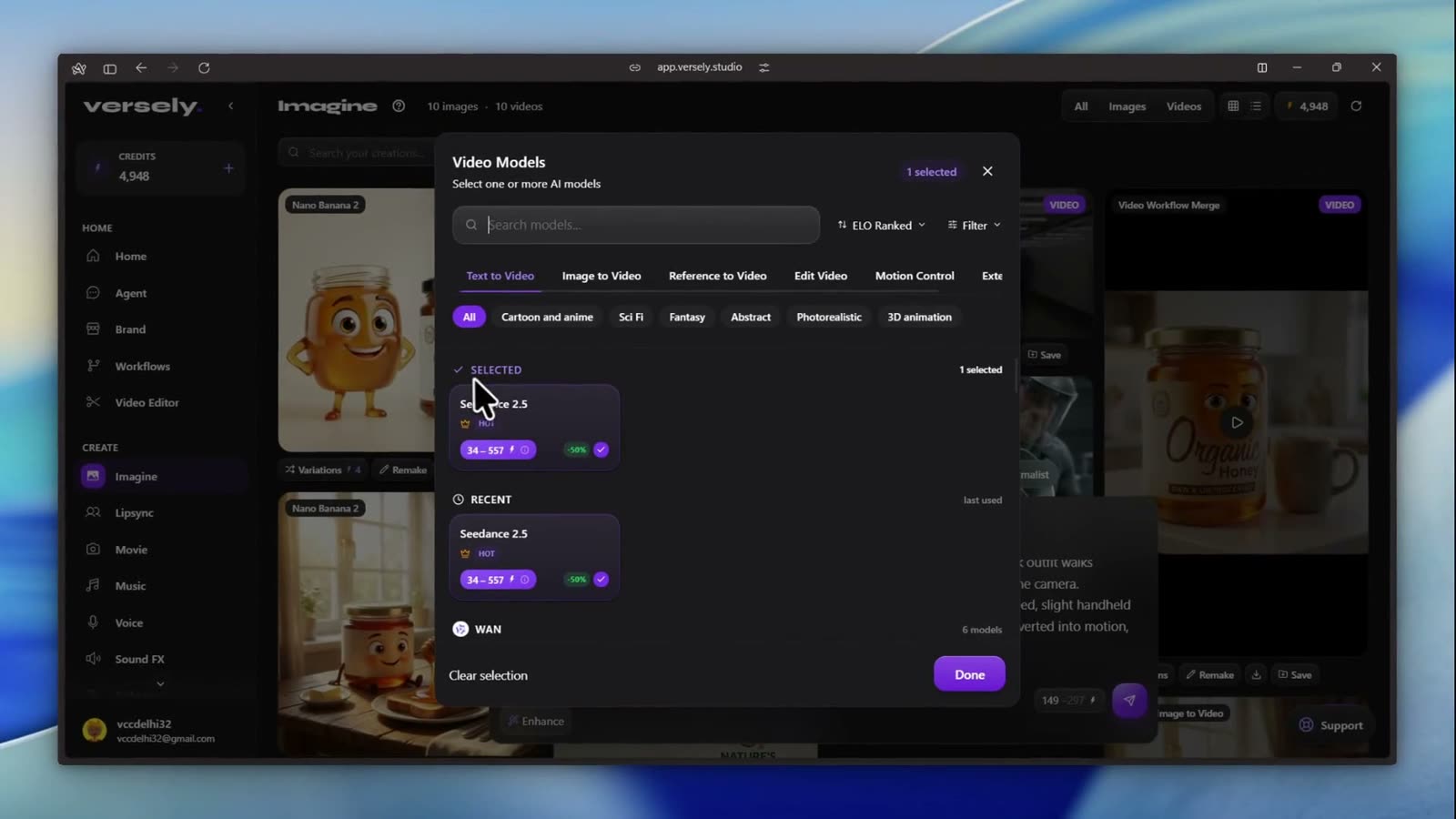 Video Models. The style chips (Cartoon and anime, Sci Fi, Fantasy, Abstract, Photorealistic, 3D animation) filter the list by the Artificial Analysis category ranks.
- Write the prompt in Describe the video you want to generate.... From the video:
8-second vertical fashion film in an underground metro station. A model in a minimal dark outfit walks naturally toward the camera while commuters move around her without acknowledging the camera. Fluorescent lights flicker subtly across tiled walls. Camera walks backward at matching speed, slight handheld movement, occasional passerby briefly blocks the frame. Editorial street photography converted into motion, understated and realistic, no runway posing.
- Set the chips: ratio (16:9 in the video, 9:16 for a Reel), the clock chip for length (8s), and the quality chip (720p; the menu shows 480p under SD and 720p under HD). The Settings chip holds the Audio toggle and the format.
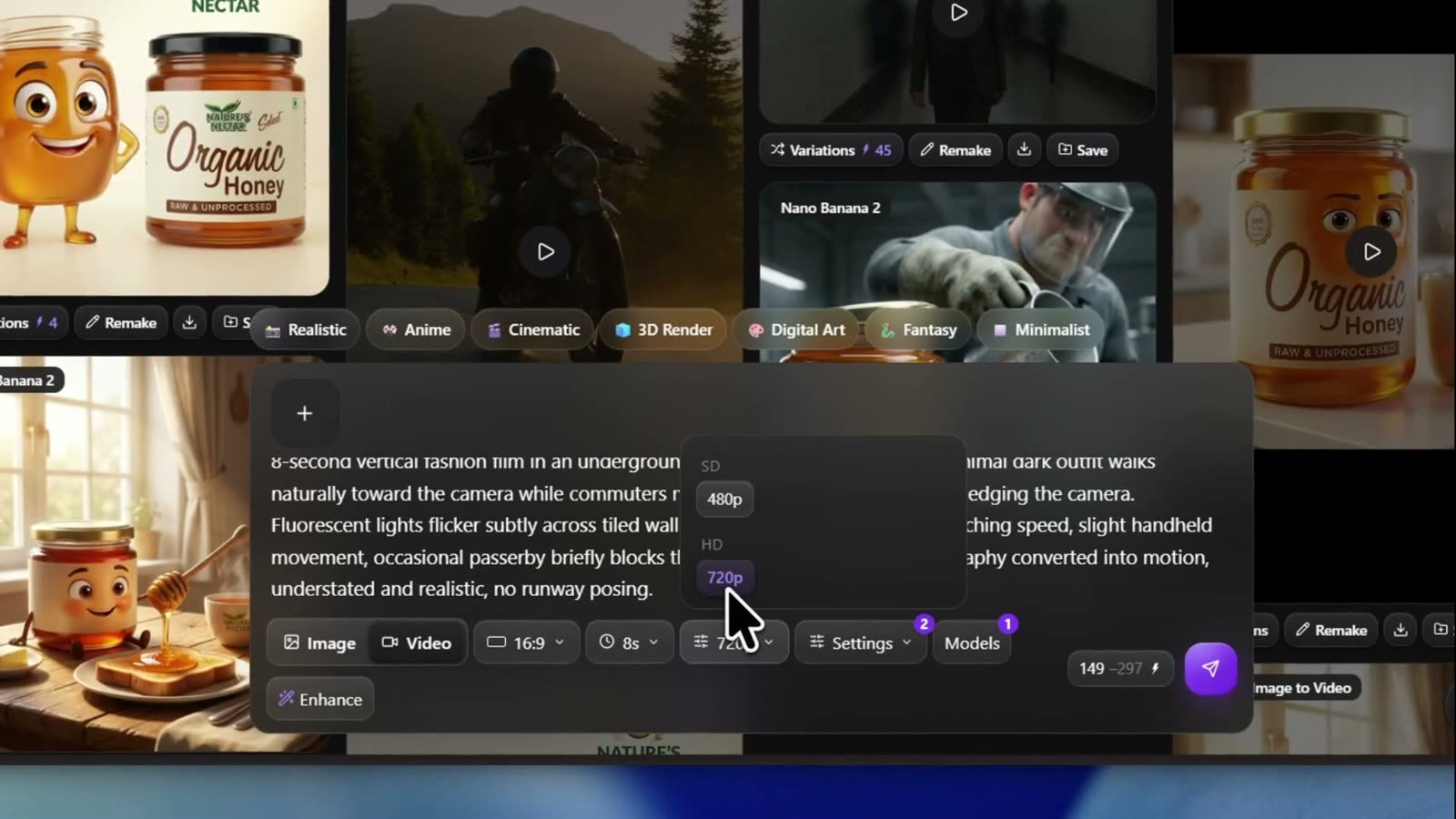 On 13 September, 8 seconds at 720p quoted 149 credits with 297 struck through; at the 29 October discount it is about 90. Hover the send button and the tooltip repeats the total; in the recording it read Generate (~149 credits).
- Click the send arrow. Generation started appears and the card in the grid shows a percentage while it renders. Seedance takes a few minutes for longer takes; you can keep working in the studio.
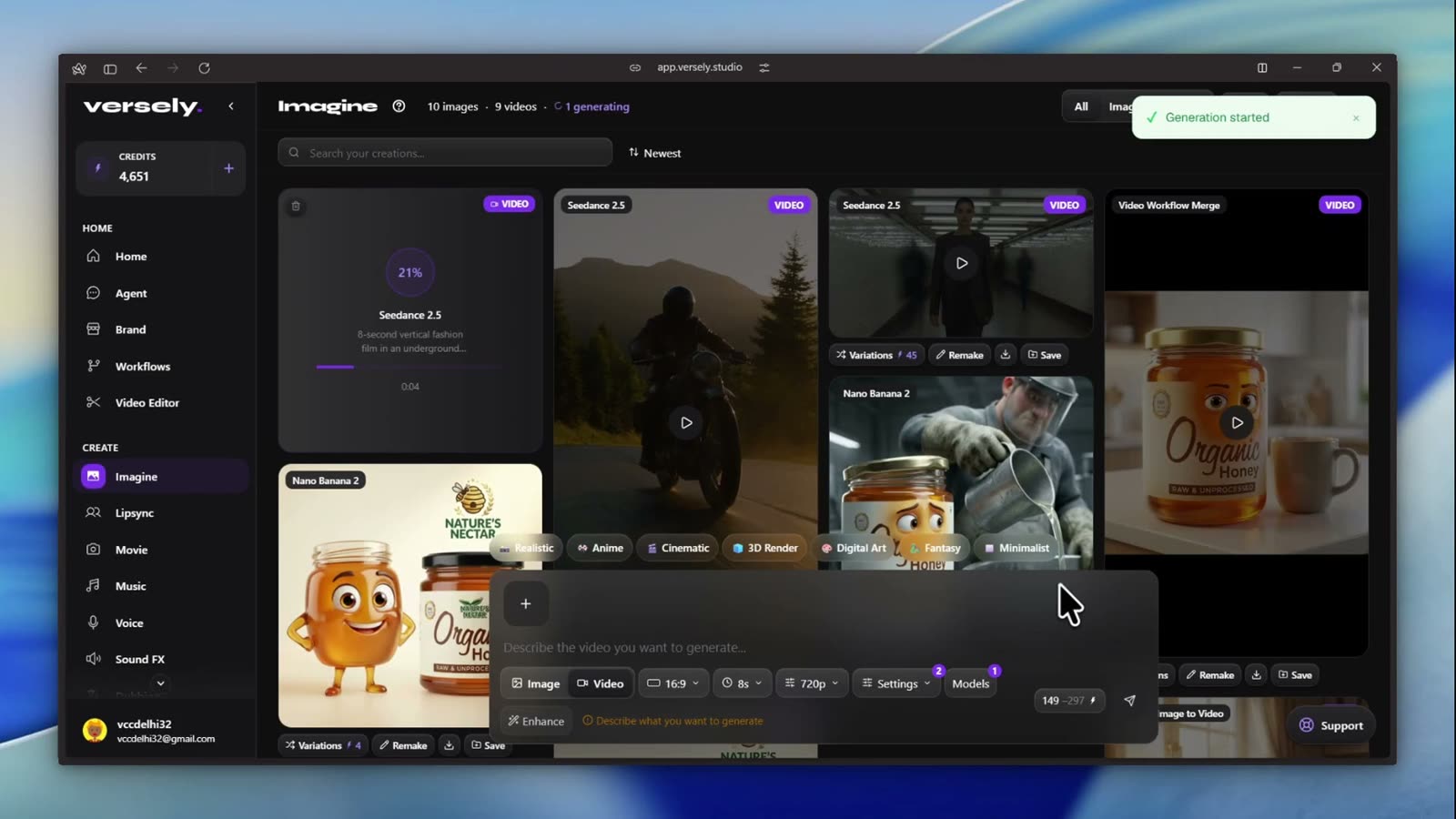 The progress card. Every video in the grid is tagged VIDEO so you can filter with the Videos button at the top right.
- When the toast says Video ready, click the card. It plays inline with sound, and the Details panel shows the prompt, model, type and time, with Download and Regenerate underneath.
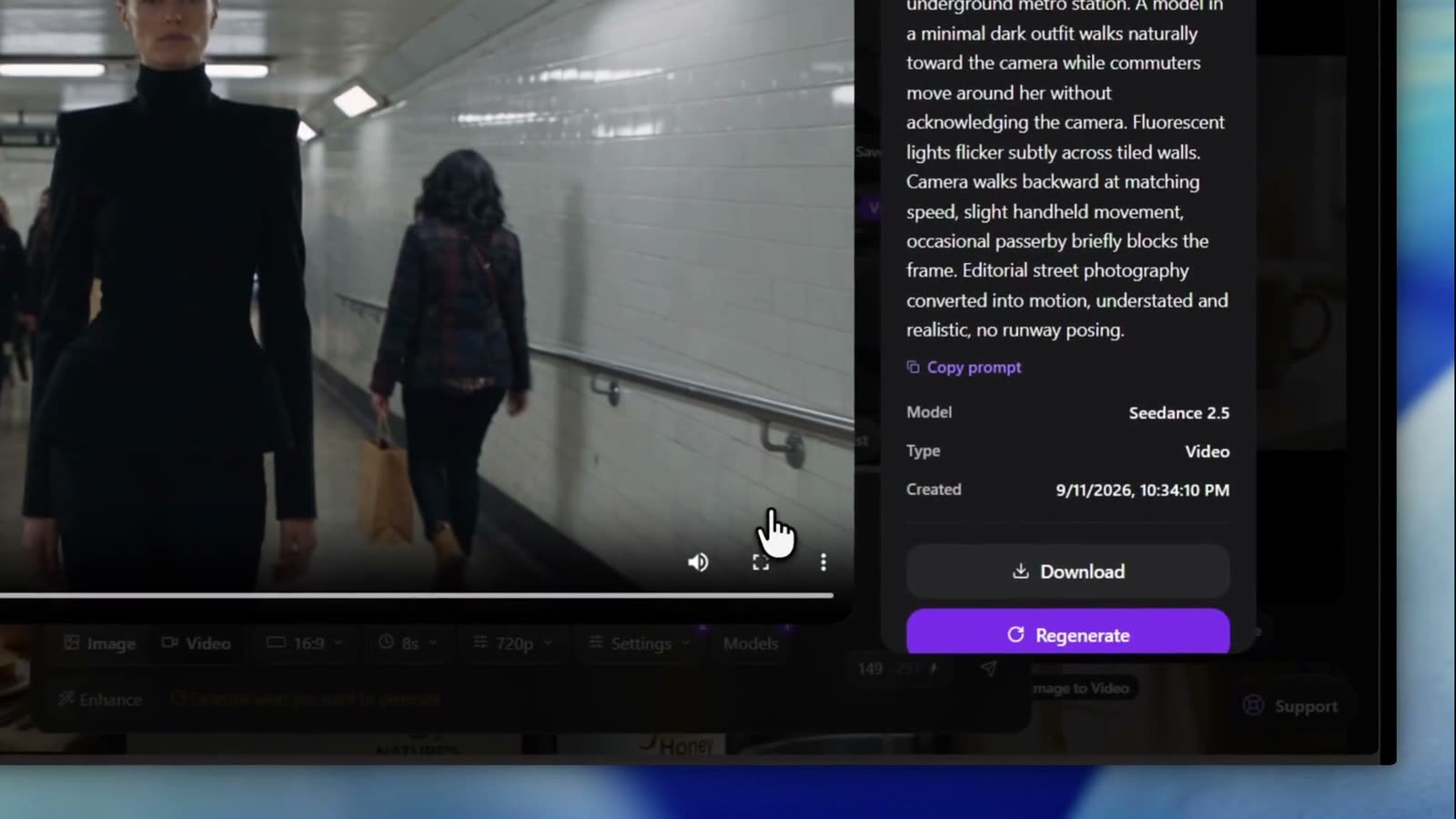 Download gives you the mp4. Regenerate reruns the same prompt and settings for a second take at the same price.
Shortcut: app.versely.studio/imagine?model=Seedance 2.5&mode=video opens the composer with the model already picked.
Starting from a still
Switch the picker tab to Image to Video and choose Seedance 2.5 Image to Video. The tray above the prompt now has two slots, First frame and Last frame. Drop your still in the first. Add a second image only if you want the clip to end on it. Attaching an image in the composer flips the category for you, so you can also just drag a card from the grid onto the composer.
Locking a character with references
Pick Seedance 2.5 Reference to Video, then click the References chip. The Add reference modal has three sections: reference images (up to 30), reference videos (up to 10) and reference audio (up to 10). In the prompt, address them as @Image1, @Video1, @Audio1. Reference budget on Seedance explains how many you actually need.
In the iOS app
The Versely Studio app shows the same three rows.
- Accept the AI data consent notice on first launch (ByteDance is listed). It lives under Settings, AI Data & Privacy afterwards.
- Tap the centre + on the tab bar, then Video Studio. The title reads Video and the composer toggle sits on Video.
- Tap Choose models. In Select Video AI Models, the chip rail across the top has Text to Video, Image to Video, Reference to Video and the rest. Search
seedanceand tap Seedance 2.5 (or the Image to Video or Reference to Video row) in the ByteDance rail. Tap Done. - Type or dictate the prompt.
- Tap the aspect chip (Aspect Ratio sheet), the clock chip (Video Duration sheet, one card per second from 4s to 30s) and the quality chip (Video Quality, SD for 480p, HD for 720p).
- The Audio On / Audio Off chip appears in the composer because Seedance is audio-capable. Leave it on unless you are laying your own track later.
- For Image to Video, the composer shows First Frame and Last Frame slots. Tap the first to pick from your library.
- Tap ↑. The badge is the price. The clip lands in the studio feed and in Media under Videos. Use Download to save to your camera roll or Share to send it on.
Making it actually go viral
Seedance 2.5's edge is a continuous shot, so brief it like a shot, not a montage:
- Give the camera a job. "Camera walks backward at matching speed" is a direction. "Cinematic" is not.
- Put the sound in the prompt. Native audio follows what you describe. Say "fluorescent hum, footsteps echoing" if you want to hear it. Write the sound into the prompt has the pattern.
- Test at 480p and 4 to 6 seconds. A 4-second 480p test is 22 credits and tells you whether the idea works before you spend up to 320 on a 30-second 720p version.
- Go vertical on purpose. 9:16 at 720p is a 720 by 1280 frame, which is fine for Reels and TikTok. Don't count on more resolution than that; the ceiling is 720p.
- Cut inside the prompt if you need cuts. How to direct cuts inside one Seedance pass shows how to ask for them without stitching.
One product note: Seedance 2.5 is not on the Movie studio's scene-model list yet, so it is generated here in Imagine or through the agent, and stitched into longer pieces in the video editor.
What I'd actually do
- Open app.versely.studio/imagine in Video mode with Seedance 2.5 selected.
- Run the prompt at 480p, 5s, 9:16 for about 30 credits. Judge motion and audio, not sharpness.
- When the movement is right, Regenerate at 720p and the real length. Eight seconds is enough for most hooks; go long only when the take is the whole post.
- If you already have a hero still, use Image to Video with it as the First frame instead of describing it again.
- Add captions and a title card in the editor, then post from the same account.
FAQ
How much does Seedance 2.5 cost on Versely?
On 29 October 2026, text to video and image to video are 6 credits a second at 480p and 11 at 720p, at 70% off (17 and 38 at full price). Reference to Video has no discount: 17 and 38 a second, from 67 credits. The composer shows the total for the exact length and quality before you send.
Can Seedance 2.5 do 1080p or 4K?
No. Its maximum output is 720p on every host Versely uses. Pick 9:16 or 16:9 at 720p and keep the shot tight.
Does the clip come with sound?
Yes, when the Audio toggle is on (the default). The model generates dialogue, foley and ambience from the prompt in the same pass.
What is the difference between Image to Video and Reference to Video?
Image to Video animates one still (plus an optional closing frame). Reference to Video takes a stack of images, videos and audio that condition the whole take without any one of them being the first frame. Image to video vs reference explained goes deeper.
Can I generate it from the Versely agent?
Yes. In Agent, describe the shot and name the row, for example "use Seedance 2.5 Image to Video". The agent matches model names literally, so use the full name.
Start at app.versely.studio/imagine, or compare every video model on the AI video generator page.
Versely AI Weekly
New AI models, every Thursday.
The image, video, audio and LLM models released that week, what each is good for, and what's new on Versely.