

Overview
AI video swap re-makes a clip with one thing changed: the person, what they wear, the product in their hand, the place or the whole look. On Versely it is a studio called Versely Remix. Start from a trending reel, a TikTok, Instagram, YouTube or X link, or your own upload, keep up to 15 seconds of it, add a photo of what should change, and get the clip back with its moves, camera, timing and original sound.
It is not a face swap. A Person swap re-renders the whole person from your photo, so the hair, build and clothes come from the photo too: in the demo above, the plaid pyjamas became Beatrix's pink tweed. To change only the clothes, skip the Person slot and add an Outfit.
Every remix costs credits, shown on the bar before you press Generate: from 30 credits for 5 seconds at Lite 480p to 1,449 for 15 seconds at Pro 1080p. The demo above (8 seconds, Pro, 720p, one take) cost 323 credits and was ready in about five minutes.
More detail
Versely Remix runs on the web at app.versely.studio/remix and in the iPhone app, where Swap is in the + Create menu, every avatar has Swap into a video, and Inspiration posts have Remix this. Takes land in the studio and in Generations, where you can add captions or schedule the post with Auto Post.
Where to go next
What you can swap
Person
Someone else does exactly what the original did. Use a photo, one of your avatars, or one of 32 ready-made characters under Another avatar. Example: you, or your brand's mascot, in a trending dance.
Outfit
Same person, same walk, different clothes. Example: a try-on reel where one strut is re-dressed in your new jacket.
Product
Swap the can, bottle or box in a hand or on a table. Example: a gym clip where the drink becomes yours. Write what must stay legible under Anything else.
Place
Keep the action, move the setting. Example: a kitchen dance set on a rooftop instead, from a photo of the rooftop.
Style
Re-render the whole clip in another look, from a picture of that look. Example: a street clip in clay animation, with the same moves and cuts.
Other
Anything that is not a person, outfit, product or place: a car, a pet, a sign on the wall. Example: the hatchback in a car reveal becomes your model.
How it works
- 1
Pick the clip
Open Versely Remix. Tap Recreate on a reel under Trending to recreate, paste a TikTok, Instagram, YouTube or X link, or choose Upload a clip (up to 200 MB). A clip longer than 15 seconds opens a scrubber: drag to the part you want and tap Use this part.
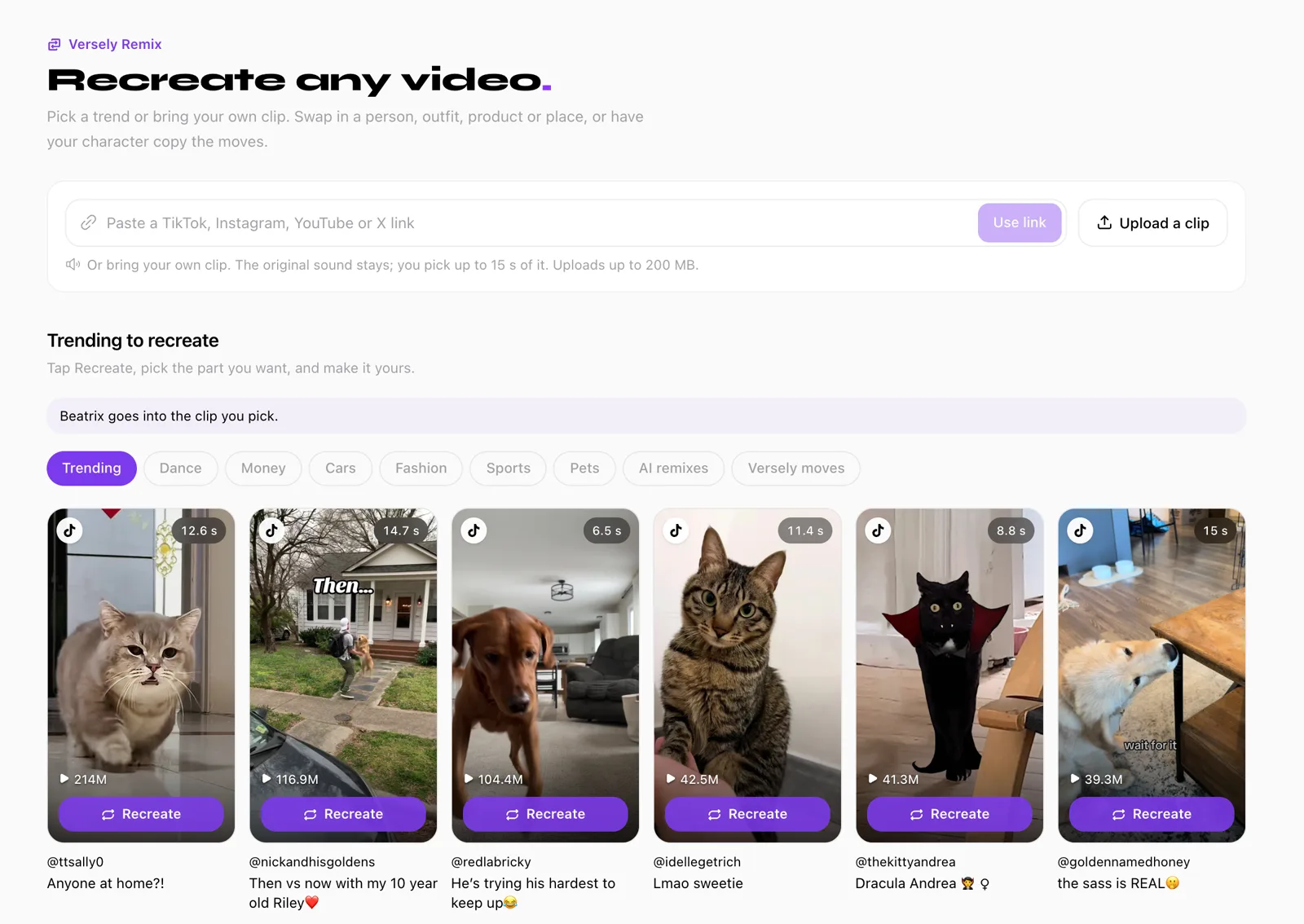
The studio's first screen, 4 November 2026. - 2
Choose Swap or Copy the moves
Under Make it yours, Swap changes the person, outfit, product, place or style and keeps everything else. Copy the moves puts your person or character into the clip's moves, and a new place or style is optional.
- 3
Add what changes
Under What to swap, add one slot per change (Person, Outfit, Product, Place, Style or Other) and give each a photo, up to 8 in all. A Person can also be one of your avatars or a ready-made character. If the clip has more than one person, fill in What in the clip, for example “the woman on the left”.
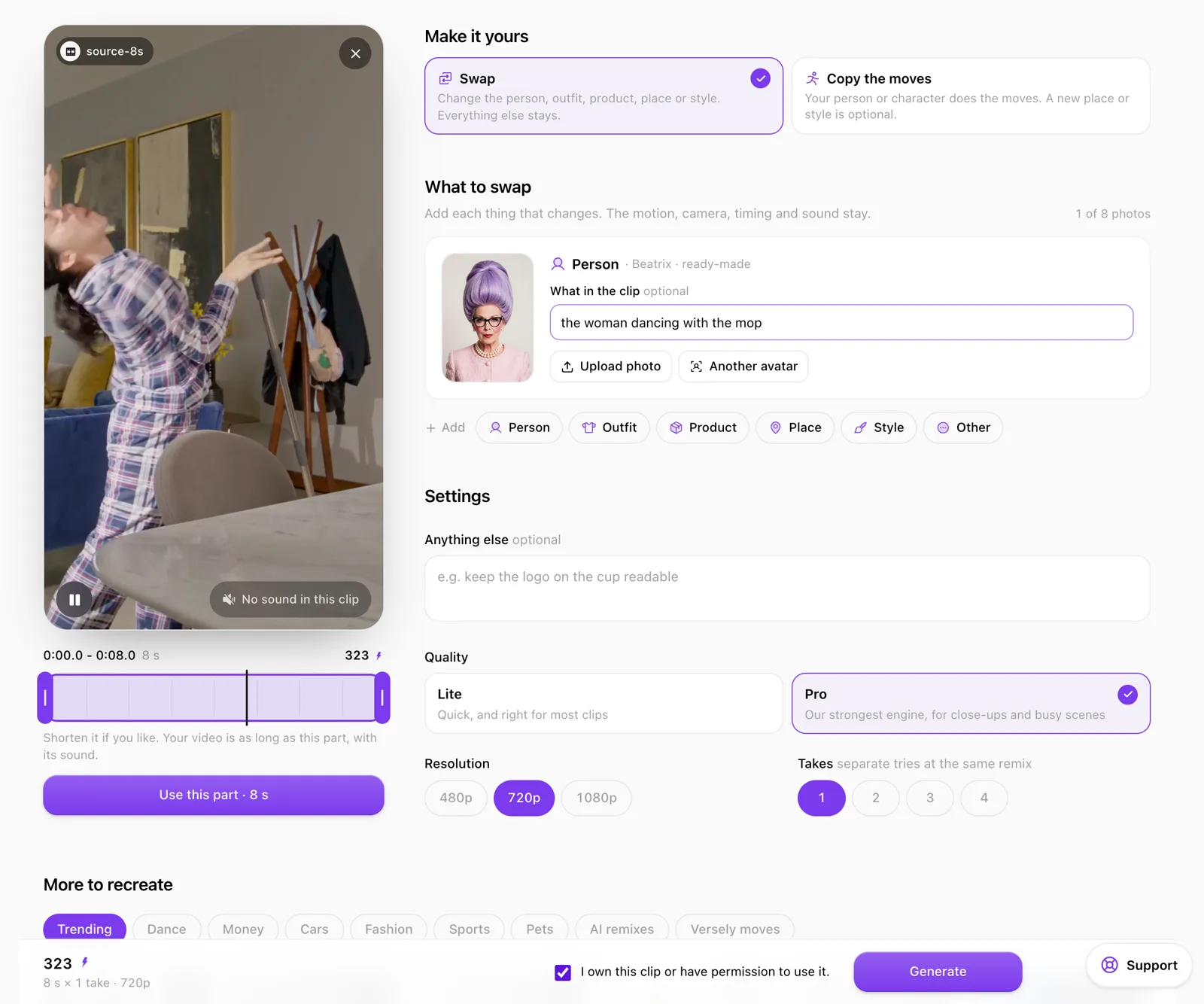
The demo's setup: Person = Beatrix, Pro, 720p, 1 take, 323 on the bar. - 4
Check the price and generate
Pick Lite or Pro, 480p, 720p or 1080p, and 1 to 4 takes. The price is on the bar before Generate. Tick “I own this clip or have permission to use it.” and generate. The take appears in the studio and in Generations, ready for Add captions or Auto Post.
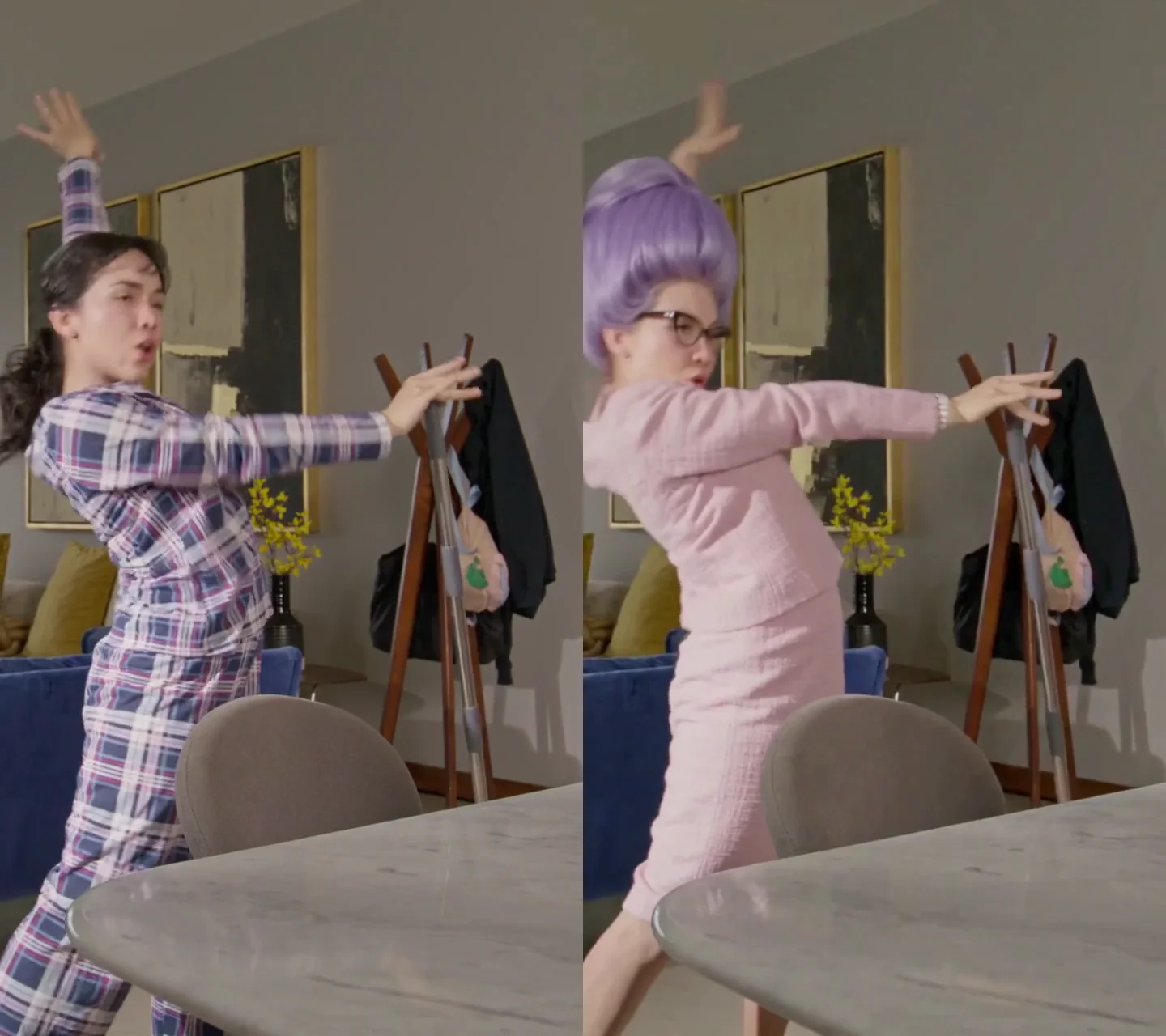
Frame 4.2 s of the demo: the original (left) and the Pro take (right).
What a swap costs
Credits for one take, as the studio quoted them on 4 November 2026. Swap and Copy the moves cost the same.
| Quality | Resolution | 5 s | 10 s | 15 s |
|---|---|---|---|---|
| Lite | 480p | 30 | 60 | 89 |
| 720p | 60 | 119 | 178 | |
| 1080p | 119 | 237 | 356 | |
| Pro | 480p | 95 | 189 | 283 |
| 720p | 202 | 403 | 605 | |
| 1080p | 483 | 966 | 1,449 |
- Takes multiply the price: two takes of a 10-second Lite 720p remix are 238 credits.
- The studio prices any length from 4 to 15 seconds and shows the number on the bar before Generate (the demo read “323 · 8 s × 1 take · 720p”). Nothing is charged until you generate.
- The demo at the top was 8 seconds at Pro 720p: 323 credits. The same clip at Lite 720p is 95.
- Credits come from your one Versely balance, the same one every other model on Versely draws on. There are no free remixes.
Lite or Pro
Lite
“Quick, and right for most clips”
Start here: a full-body dance, a product on a table, a new outfit on a clear walk. Draft at 480p to see whether the swap reads (30 credits for 5 seconds), then run the keeper again at 720p or 1080p.
Pro
“…for close-ups and busy scenes”
For close-ups, where a face or a product fills the frame, and busy scenes with several people or a lot moving behind the subject. It costs about three to four times Lite at the same length and resolution: 605 credits against 178 for 15 seconds at 720p.
What makes a good source clip
The swap keeps what the clip does, so the clip decides most of the result.
- One clear subjectThe person or thing you swap should be easy to pick out for most of the clip, not a face in the back of a crowd.
- The whole body in frame for a body swapA Person swap re-renders the whole person. If the clip crops at the knees, the new person is cropped at the knees too.
- Steady framingThe camera move is kept as it is. A clip that whips past its subject keeps whipping past the new one.
- Several people? Say which oneFill in What in the clip, for example “the woman on the left” or “the man in the red jacket”.
- 4 to 15 seconds, with the action in itA longer upload or link opens a scrubber: drag to the part you want and tap Use this part. The video is as long as that part, with its sound.
- A clean photo of what goes inFace and clothes visible for a Person, the whole garment for an Outfit, the label facing the camera for a Product.
What it will not do
Run past 15 seconds. A longer video means several remixes that you join yourself, each priced on its own.
Paste a face onto a body. A Person swap re-renders the whole person from your photo, hair and clothes included. In the demo, Beatrix's beehive, glasses and pink tweed came through, and her face reads younger than her portrait. Expect a resemblance, not a copy.
Change what anyone says. The original sound stays, so the new person performs the clip's own audio. To put new words in a mouth, use AI lipsync.
Promise every take. Each take is a separate try at the same remix, and each is charged. Run one, look at it, then decide whether you need more.
Guess which text matters. If a label or logo has to stay readable, say so under Anything else. The studio's own example is “keep the logo on the cup readable”.
Your clip, your rights
Remix will not generate until you tick “I own this clip or have permission to use it.” Reels in the trend library belong to their creators; Recreate makes your own version of the format.
The library leaves out public figures, minors, nudity, violence and clips with another app's watermark. Swap in yourself, your saved avatars, the 32 ready-made characters or your own products, and do not put a real person into a clip without their consent.
Start from a trend
The library the studio opens with. Each card shows the reel's length and views; Recreate opens it in Versely Remix, where you pick the part to keep.
Trending to recreate
Pick a trending reel, cut the part you want, and put yourself, your avatar or your product in it.
Who uses AI Video Swap
- Recreating a trending dance with your own character
- Try-on reels: one walk, several outfits
- Putting your product into a format you have rights to
- A brand mascot in a meme format
- Moving one shoot to a new location
- Drafting at Lite 480p before paying for Pro
Frequently asked questions
How do I replace a person in a video with AI?
Open Versely Remix, start from a trend, a link or an upload, and keep up to 15 seconds. Choose Swap, add a Person slot and give it a photo, one of your avatars or a ready-made character; if there is more than one person in the clip, say which under What in the clip. Pick Lite or Pro and a resolution, check the price on the bar, confirm you own the clip or have permission, and generate. The new person does the original's moves, with the camera and sound kept.
Is AI video swap the same as a face swap?
No. A face swap pastes a face onto the original body. A Person swap in Versely Remix re-renders the whole person from your photo, hair and clothes included, inside the original motion, so expect a resemblance to the photo rather than an exact copy. It is meant for you, your avatars, ready-made characters and your products, not for putting real people into clips without their consent.
Can I change the clothes in a video and keep the person?
Yes. Add an Outfit slot with a photo of the garment and leave the Person slot out. The person, the walk and the camera stay and the clothes change. For several outfits, run one remix per outfit.
Can AI replace a product in a video?
Yes, with a Product slot. Use a photo with the label facing the camera, point at the item under What in the clip if there are several, and write what must stay legible under Anything else; the studio's own example is “keep the logo on the cup readable”. For an ad, the clip has to be one you own or have permission to use.
How long can the video be?
Each remix uses 4 to 15 seconds. Upload a clip of up to 200 MB or paste a link; anything longer than 15 seconds opens a scrubber so you keep the part you want, and the result is as long as that part. A longer video takes several remixes.
Does the swapped video keep the original sound?
Yes. The original sound stays, and the result runs as long as the part you picked. The demo on this page started from a silent stock clip, so it has no sound to keep.
How much does AI video swap cost?
One take costs from 30 credits (5 seconds, Lite, 480p) to 1,449 credits (15 seconds, Pro, 1080p), as the studio quoted on 4 November 2026. Swap and Copy the moves cost the same, takes multiply the price, and the exact number is on the bar before you generate. There is no free tier.
Should I use Lite or Pro?
Lite, which the studio describes as “Quick, and right for most clips”, suits full-body dances, products on a table and drafts. Pro is for close-ups and busy scenes: a face or product that fills the frame, or a crowded background. Pro costs about three to four times as much, so draft on Lite first.
Can I swap more than one thing at once?
Yes. Add a slot for each change, up to 8 photos in all: a new person and a new place, or an outfit and a product. Give each slot a What in the clip hint when the clip has more than one candidate.
Can I remix any TikTok or Instagram video?
Only clips you own or have permission to use; Remix asks you to confirm that before it generates. The Trending to recreate library leaves out public figures, minors, nudity, violence and other apps' watermarks, and its reels belong to their creators: Recreate makes your own version of the format.
Can I swap a video on iPhone?
Yes. In the Versely iPhone app, Swap is in the + Create menu, every avatar has Swap into a video, and Inspiration posts have Remix this. The web studio is at app.versely.studio/remix. Both use the same account and credits.
Try AI Video Swap inside Versely
The all-in-one AI studio for creators. 60+ models for video, image, voice, music and lipsync, in your browser or on your phone.
Free on the web and on iPhone, one account.