

Overview
Trends is Versely's viral video analyzer. Paste the link to a TikTok, Instagram Reel, YouTube Short or X post, and Versely watches the video and writes a report: a viral score out of 100, why the hook works, the pacing, a timeline of beats, every on-screen text, the audio, a shot list and how to remix it. It costs 2 credits, refunded if the analysis fails, for videos up to 3 minutes long.
The report comes from the video itself, not only the caption: lines spoken in the hook are quoted with timestamps, and on-screen text is read in the order it appears. When Versely cannot watch the video, the report says it read the thumbnail and caption, or only the caption, so you always know what it rests on.
From the report you can go three ways. Remix the script sends it to Remix a viral script, for a script in your voice that you film yourself. Make my version asks the Agent to remake it with an AI character, around your product or with your own clips. Remix this opens the clip in Versely Remix to swap yourself or your product in.
More detail
Trends is on the web at app.versely.studio/trend-analysis, and every report is kept in your history there. On iPhone, paste the link into the Agent tab and ask why it went viral; the Agent runs the same analysis for the same 2 credits.
Want the post's engagement as one number first? The free engagement rate calculator works out a post's rate by followers, reach or views, free and without signing in.
The facts
Trends, the viral video analyzer, in one table. Facts checked 8 November 2026.
| Links it reads | One public post from TikTok, Instagram, YouTube, X, Facebook and LinkedIn. |
|---|---|
| Length | Short-form, up to 3 minutes. A longer video is refused and the credit refunded. |
| Price | 2 credits per post, refunded if the analysis fails. |
| You get | A viral score out of 100, hook analysis, retention scores out of 10 and a predicted drop-off, a 3 to 8 beat timeline, on-screen text and key lines with timestamps, audio, visual style, editing, emotional arc, why it works, engagement signals, a shot list, how to remix it, a caption, hashtags and a best time to post. |
| Post numbers | Views, likes, comments, shares and saves, where the platform shows them. |
| What it rests on | Labelled on every report: watched the video, read the thumbnail and caption, or read the caption only. |
| Next steps | Remix the script in Remix a viral script (1 more credit), Make my version with the Agent, or Remix this in Versely Remix. |
| Where | The web, at app.versely.studio/trend-analysis, with every report kept in your history. On iPhone, through the Agent tab. |
Where to go next
- Analyze a post in chatThe same analysis from the Agent, on iPhone or the web.
- Find what's trendingAsk the Agent for trending posts in a niche, then analyze one.
- Hook rateThe share of viewers still watching a few seconds in.
- Engagement rate calculatorA post's engagement rate by followers, reach or views, free.
What the report covers
Viral score
A score out of 100 with a band: 70 and up is High virality, 40 to 69 Moderate, under 40 Low. It grades the craft of the hook, pacing and payoff; it is not a forecast of views.
Hook and retention
What grabs attention in the first two or three seconds, hook strength, payoff strength and loop potential out of 10, and the moment a viewer is most likely to swipe away.
Beat-by-beat timeline
Three to eight beats with start and end times, a short label, what happens and the technique at work, such as a reveal or a jump cut.
On-screen text and audio
Every text overlay word for word with its timestamp, whether the sound is a voiceover, dialogue, music or original sound, and the key spoken lines quoted.
Visual style and editing
The setting, lighting, colour palette and camera work, how often it cuts, the transitions and effects, and the text style.
Shot list and how to remix it
A numbered shot list you could film today, step-by-step notes for your version, a suggested caption, hashtags and a best time to post.
How it works
- 1
Paste a link
Open Trends at app.versely.studio/trend-analysis and paste a post link from TikTok, Instagram, YouTube, X, Facebook or LinkedIn. The box names the platform it found and the price: 2 credits, short-form only, up to 3 minutes.
- 2
Versely watches the video
It reads the post, then watches the video itself. A video longer than 3 minutes is refused as soon as its length is known, and the credits come back.
- 3
Read the report
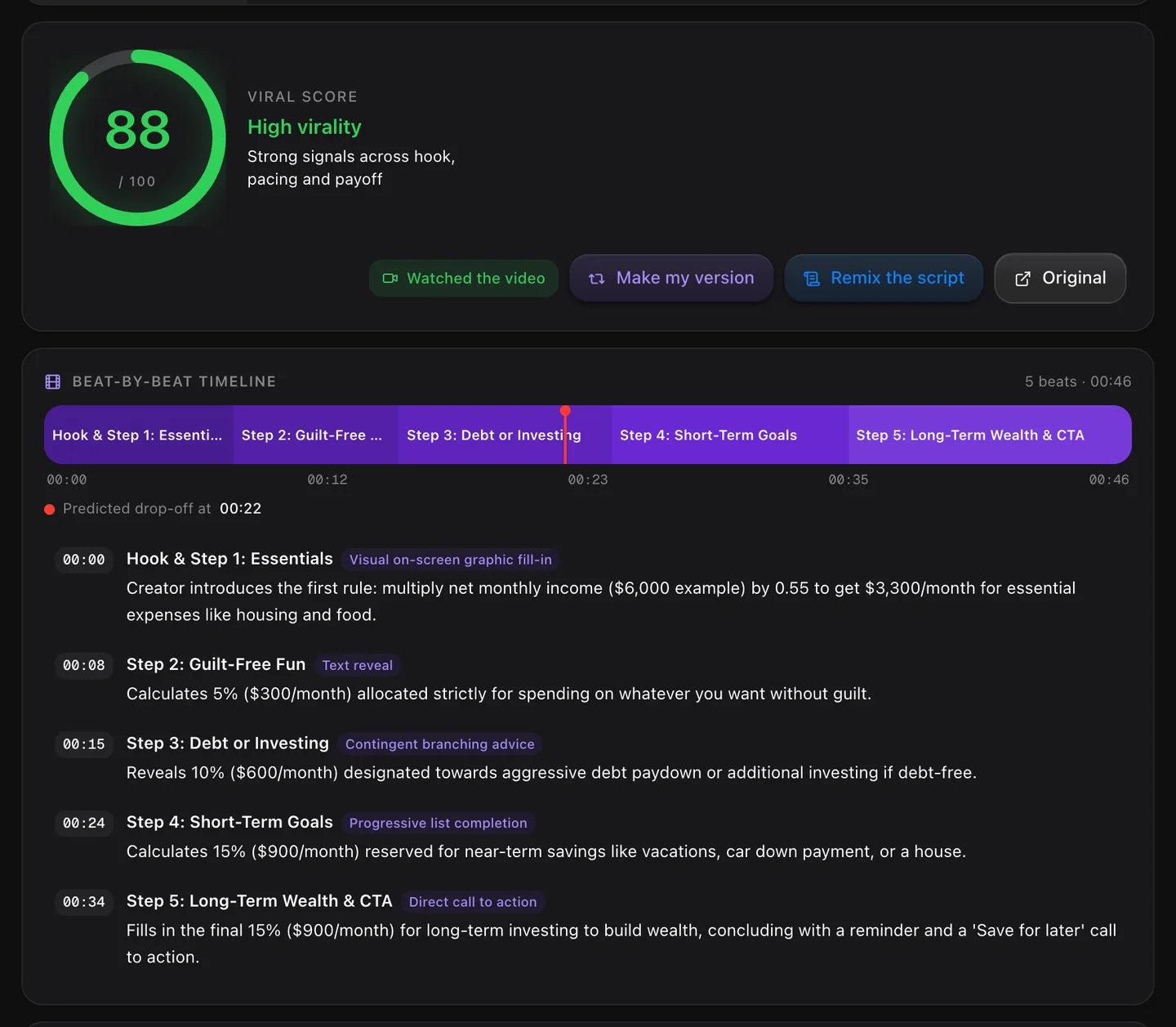
At the top are the score, its band and what the report rests on (the video, or only the thumbnail and caption), then the timeline. Below them: the summary, hook analysis, retention, audience, format and pacing, audio, on-screen text, visual style, editing, emotional arc, why it works and the engagement signals.
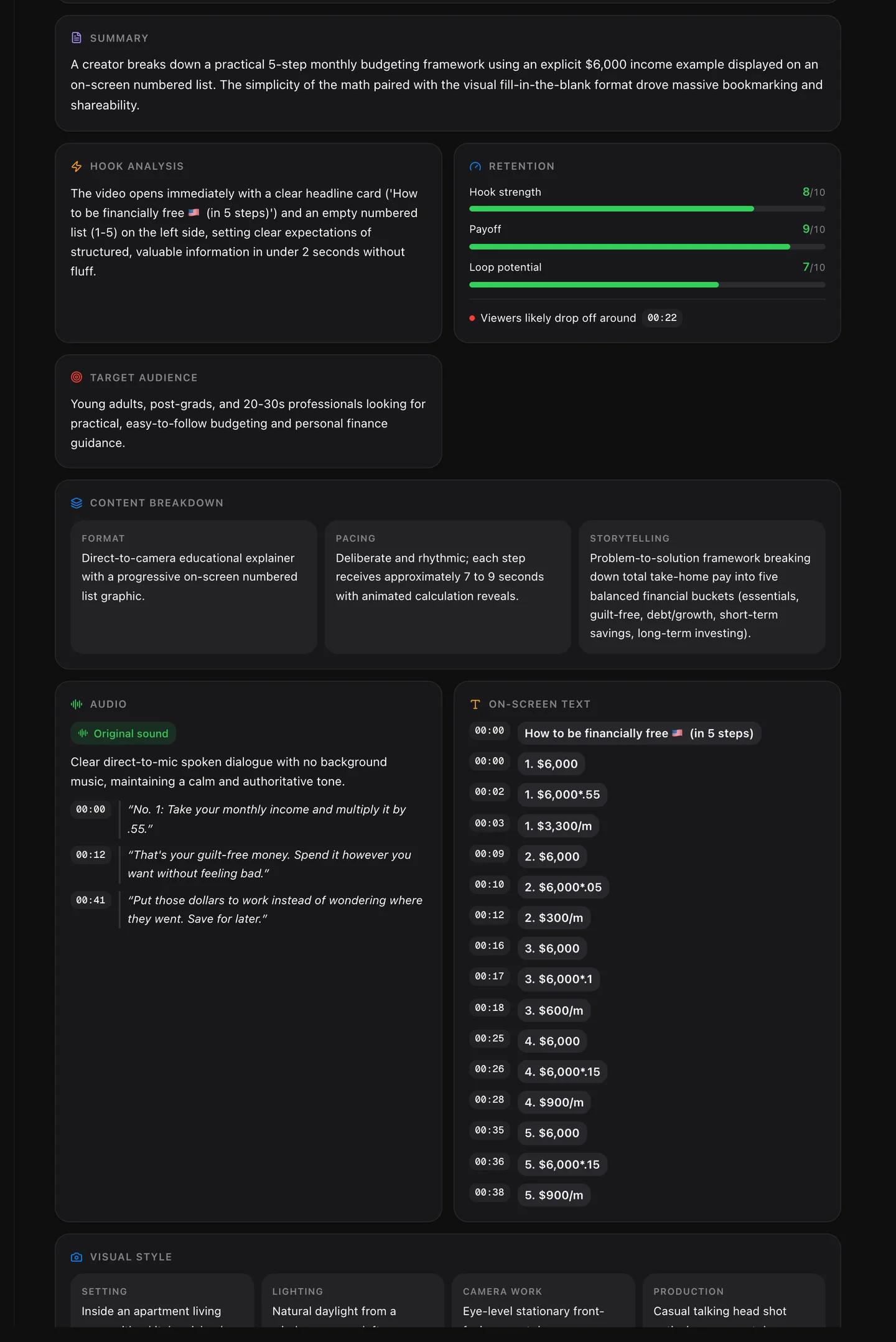
Summary, hook, retention, audience, breakdown, audio and on-screen text from the same report. - 4
Make your version
The timeline, the shot list and How to remix it are the playbook. Remix the script sends the post to Remix a viral script for a script to film; Make my version asks the Agent to remake it; Remix this opens it in Versely Remix.
A real report, in numbers
Trends on a 46-second TikTok finance explainer on how to be financially free in 5 steps, with 3.7 million views, run on 7 November 2026. The screenshots above are from this report.
- Viral score
- 88 / 100, High virality
- What it rests on
- Watched the video
- Timeline
- 5 beats across 0:46
- Predicted drop-off
- 00:22
- Hook strength
- 8 / 10
- Payoff
- 9 / 10
- Loop potential
- 7 / 10
- Audio
- Original sound
The same report then fed two scripts: an English one about running a café (2 credits, which included watching the video) and a Hinglish one for college students (1 credit). One link, one report, two scripts: 3 credits in all.
How to read the viral score
The score is Versely's judgement of the craft in the video, out of 100: how strong the hook is, whether the pacing holds, whether there is a payoff. It is not a forecast of views.
| Score | Band |
|---|---|
| 70 to 100 | High virality |
| 40 to 69 | Moderate virality |
| 0 to 39 | Low virality |
- Retention gives three more numbers out of 10: hook strength, payoff and loop potential (how likely a viewer is to watch again), plus the moment a viewer is most likely to swipe away.
- Read the reasons under the number, not only the number: the hook analysis, the timeline and Why it works say which part of the video earned the score.
- Now and then the report comes back without a score. The playbook is still there, and the page says so.
What the report rests on
Next to the score, every report says what Versely actually had to work with, so a report built from a caption is never mistaken for one built from the video.
Watched the video
Versely had the video file and watched it. Timestamps, quoted lines and on-screen text come from the video itself.
Read the thumbnail and caption
Versely had pictures, not the video: the cover of a video it could not fetch, or the photos of an image post. The report works from those, the caption and the post's numbers.
Read the caption only
No media at all. The report keeps to what the caption and numbers support and does not describe shots it never saw.
From the report to your version
The report is the research. These are the three ways out of it, each a button on the report (Remix this shows for TikTok, Instagram, YouTube and X links).
- Remix the script
Opens Remix a viral script with this report, for a script in your voice that you film yourself. 1 credit, because the video is not watched again.
How Remix a viral script works - Make my version
The Agent gets the whole report as its brief and remakes it with the same hook, beats and pacing: with an AI character, around your product, or cut from your own clips. It plans the remake, then makes it; that video costs credits of its own.
- Remix this
Opens the clip in Versely Remix, where you swap yourself, your avatar or your product in and keep the moves, camera and sound. From 24 credits.
How Versely Remix works
On iPhone: ask the Agent
The Versely iPhone app has no Trends screen; the Agent runs the same analysis. Open the Agent tab, paste the link and ask. It costs 2 credits, the same as on the web, and the chat messages themselves use a small amount of credits too.
You can also upload a video you saved to the chat instead of a link. It is analysed the same way, but without views or likes, because an upload has none.
- “Why did this reel go viral? [paste the link]”
- “What should I copy from this TikTok for my bakery?”
What it will not do
Analyze videos longer than 3 minutes. Trends is for short-form. A longer video is refused as soon as its length is known, and the credit comes back.
Read private or deleted posts. It reads public posts. A post it cannot open fails, and the credit is refunded.
Predict your views. The score grades the video's craft. Reach also depends on the account, the timing and luck, which no report can see.
See the creator's private analytics. It uses what the post shows publicly: views, likes, comments, shares and saves, where the platform gives them.
Describe what it could not see. When it only had the thumbnail and caption, or only the caption, it says so and keeps to what those support.
Who uses Viral Video Analyzer
- Creators choosing which trend to make their own
- Social media managers briefing an editor
- Brands studying a competitor's best reel
- Agencies building a shot list from a reference
- Learning short-form editing from posts that worked
- Finding out why your own post took off
Frequently asked questions
How do I find out why a video went viral?
Paste its link into Trends on Versely. Versely watches the video and reports what the hook does in the first seconds, how the pacing and payoff hold attention, what is said and shown on screen, and a viral score out of 100 with the reasons behind it. It costs 2 credits.
Which platforms does the analyzer support?
TikTok, Instagram, YouTube (including Shorts), X, Facebook and LinkedIn. Paste the link to one public post.
Is there a length limit?
Yes. Trends is built for short-form video up to 3 minutes. A longer video is refused as soon as its length is known, and the credits are refunded.
What does the viral score mean?
It is Versely's read of the craft, out of 100: 70 and up is High virality, 40 to 69 Moderate, under 40 Low. It is not a prediction of views. A post can score high and still flop, or score low and be carried by its creator's audience; the reasons under the score are the useful part.
Does it actually watch the video?
Yes, when it can get the video: the hook lines and on-screen text it quotes come with timestamps from the video. If it can only get the thumbnail and caption, or only the caption, the report says so next to the score and does not describe shots it could not see.
How much does it cost?
2 credits per post, refunded if the analysis fails. Remix the script then sends the report to Remix a viral script for 1 more credit, because the video is not analysed twice.
Can it analyze private or deleted posts?
No. It reads public posts. A private or deleted post cannot be read, the analysis fails, and the credits are refunded.
Can I analyze a Reel or TikTok on iPhone?
Yes, with the Agent. Paste the link into the Agent tab and ask why it went viral. You can also upload a saved video to the chat; it is analysed the same way, but without views or likes, because an upload has none.
What can I do with the report?
Copy the shot list, caption or hashtags, or take it further: Remix the script opens Remix a viral script for your own version to film, Make my version asks the Agent to remake it with an AI character, your product or your own clips, and Remix this opens the clip in Versely Remix to swap yourself or your product in.
Can I see an analysis again later?
Yes. Every report is saved to your Trends history on the web, where you can reopen it or delete it.
Try Viral Video Analyzer inside Versely
The all-in-one AI studio for creators. 60+ models for video, image, voice, music and lipsync, in your browser or on your phone.
Free on the web and on iPhone, one account.